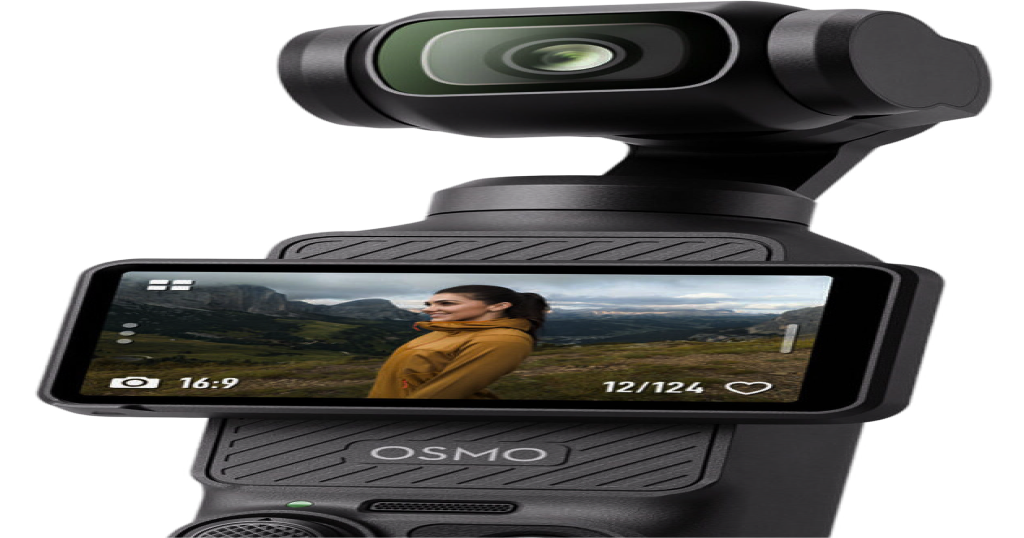
Xtra Muse as a
webcam on Mac
The Xtra Muse is a pocket-sized camera with a 3-axis gimbal, very much in the same spirit as the DJI Osmo Pocket 3. A lot of people ask whether it works as a webcam on a Mac, and whether you can steer the gimbal from the computer. We make Pocket+, a Mac app for the Osmo Pocket, and we haven't tested the Muse. So this page is a straight account of what is publicly listed and what we don't know yet.
How the Muse compares to the Pocket 3
Both are small handheld cameras with a motorized gimbal, a built-in screen, face or object tracking and a USB-C port. They are made by different companies, and the Muse isn't a DJI product. Listings describe a 1-inch sensor, 4K video and a 3-axis mechanical gimbal. Check the spec sheet of the exact model you own, because there is also a newer Muse 2 Pro with two lenses, and listings differ between versions.
What the specs say about webcam use
Retailer spec sheets for the Muse list a separate zoom limit for "UVC and Livestream": 1080p with up to 4x zoom. UVC is the standard that lets a Mac treat a camera as a plain USB webcam without installing a driver. So the Muse most likely has a webcam mode over its USB-C cable, and the kit includes a USB-C to USB-C cable.
That is where the public information stops. The listings we found don't say which apps it works with on macOS, what resolution and frame rate you get on a Mac, or how to switch the camera into that mode.
What we don't know
- Whether it shows up in Zoom, Meet, FaceTime and OBS on a Mac. A UVC camera usually does, but we haven't seen it.
- Whether the gimbal and zoom can be controlled over USB. On the Pocket 3, the camera accepts pan, tilt and zoom commands over its UVC connection, and that is how Pocket+ steers it. We don't know whether the Muse exposes the same controls. If it doesn't, a Mac app can only show the picture.
- Whether Pocket+ works with it. Pocket+ is built and tested for the Osmo Pocket. It can list other cameras, but we haven't tried the Muse, so we can't tell you it works.
How to check it yourself in five minutes
- Connect the Muse to your Mac with a USB-C cable and switch it to its webcam or USB camera mode on the camera's screen.
- Open Photo Booth or QuickTime Player (File, New Movie Recording) and pick the Muse in the camera list. If you see the picture, macOS recognizes it as a webcam.
- Open the camera menu in Zoom, Meet or OBS and select it there too.
- Try the camera's own tracking and gimbal modes. Some of them may only work from the camera's buttons, not from the computer.
If you own a Muse
We'd like to hear how it goes. If it shows up as a webcam on your Mac, tell us which model and which macOS version, and whether Pocket+ can see the camera. That's the only way we can say anything honest about it. You can reach us through the GitHub page linked on the site.
Quick answers
Can the Xtra Muse be used as a webcam on a Mac?
Its spec sheets list a UVC livestream mode, which suggests yes. We haven't verified it on a Mac.
Can I control the Muse's gimbal from a Mac?
We don't know. It depends on whether the camera accepts gimbal commands over USB, and we haven't tested that.
Is the Muse the same as the Osmo Pocket 3?
No. They are similar kinds of cameras from different makers, with different hardware and software.
Does Pocket+ support the Muse?
Not officially. Pocket+ is made for the Osmo Pocket 2, 3, 4 and 4P.
Pocket+ is an independent project and isn't affiliated with or endorsed by DJI or Xtra. DJI and Osmo are trademarks of SZ DJI Technology Co., Ltd. Xtra and Muse are trademarks of their respective owners.
Pocket+ is a free Mac app for the DJI Osmo Pocket 2, 3, 4 and 4P: aim the gimbal, track your face, switch scenes and record to your Mac.
Download Pocket+